
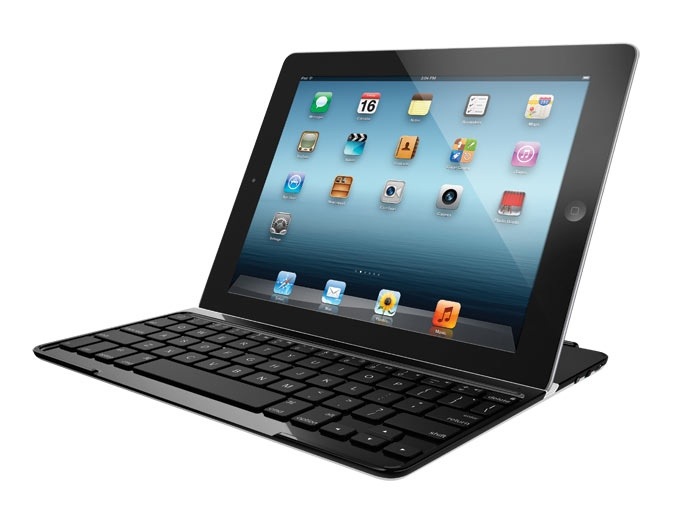
I haven’t done a hardware review yet, so let’s give it a shot. Here’s my relatively quick review of the Logitech Ultrathin Keyboard Cover. I have been eyeing one for some time now and just picked it up at Costco for $79.99; it is regularly $99.99. All the reviews have been very positive, to the extent that it has widely been rated the leading iPad keyboard and cover combination available.
I have been using another iPad keyboard, the Logitech Tablet Keyboard for iPad, for some time and have liked it quite well. But it is a totally separated keyboard unit and does not directly attach to or act as a cover for the iPad at all. There is a popular category of iPad keyboard cases and covers, and the Logitech Ultrathin Keyboard Cover occupies a unique niche among them, being not a case but merely a very low profile cover about the same thickness as the iPad itself.
There are a number of significant things to like about this keyboard cover, but there also a few drawbacks to be aware of. That it hooks up to the iPad like a SmartCover using a similar magnetic hinge is very handy, and is, I’m sure, the whole point of the thing. But since it is significantly heavier than a SmartCover, it is not as securely locked to the iPad and seems to come off easier.
And the center section of the edge opposite the hinged edge is indented to assist in pulling it off the iPad’s face, leaving it without a center magnet to attach to the free edge of the iPad, making it seem to almost not stick to the face of the iPad at all. It does turn the iPad off and on like a SmartCover does though. Just don’t expect it to mimic a SmartCover in terms of ease of folding back and forth into place covering the iPad. It will inevitably fall off if you try to fold it in portrait orientation.
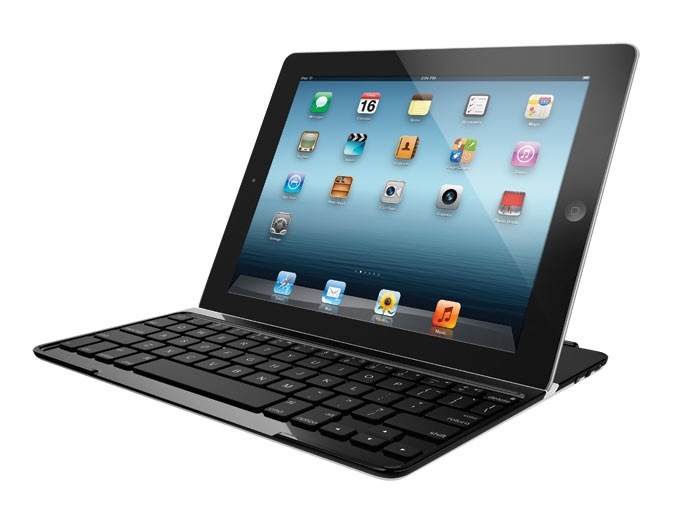
The trick, it turns out, is to treat the combination of the iPad with the Logitech Ultrathin Keyboard Cover as if it were a notebook rather than a tablet. When the two are secured together, it is best to open it like a laptop: that is to say, lay it down flat on the surface on which you intend to use it, with the Apple logo on the back of the iPad facing up – just as if it were a laptop – and then lift the iPad up from one of the edges just as you would raise the display of a MacBook. Once the iPad has rotated up, then simply twist it off the magnetic hinge and place it in the magnetized stand slot where it will pop in with a nice and secure snap.
The slot that holds the iPad in its semi-upright position has another set of magnets to secure the iPad into the slot and does so quite well, as long as you place the iPad down in landscape orientation with what would be the left side in its portrait orientation into the slot. This only seems to work well with a “bare” iPad, however. It does not seem to work as well with an iPad sporting a back cover (such as the thin, translucent one from Belkin that I use most of the time), no matter how thin or translucent the cover (not that optical characteristics should matter). The weight of my 3rd generation (and therefore also the 4th generation) iPad tends to pop the iPad out of the slot after a short stay. Without a case, though, it snaps in and stays in quite well.
That inability to stand up properly with a back cover is the other major downside to the Logitech Ultrathin Keyboard Cover. It leaves the back of the iPad unprotected. Again, it is important to remember that this is not a case, but rather a cover (as it says right there in the name of the product). It covers and so protects only the front of the iPad, not the back. You’ll want to get a sleeve to protect this combination. Or perhaps the Zagg Keyboard Folio is worth a look (I have not tried that option).
As a keyboard, it is definitely more cramped than the more fully-sized Logitech Tablet Keyboard for iPad that I have been using for over a year now, or, for that matter, any other nearly full-sized keyboard including the Apple Wireless Keyboard. But it does have a few added features that the older Tablet Keyboard does not, such as cut, copy and paste function keys. The size and closeness of the keys is, however, a bit tough to get used for someone with above average sized fingers like myself. Over time I do find myself getting used to it. After several days of use, I have adapted to it rather well actually, but the bigger keyboards are still better for longer typing sessions. I’ve written and edited this post entirely with the Logitech Ultrathin Keyboard Cover.
The big benefit of this keyboard cover is its versatility and the fact that as a cover it can stay with the iPad wherever you tote it. I have been sitting on the couch using the Logitech Ultrathin Keyboard Cover, and I realized that this is something I could not do with the Logitech Tablet Keyboard or any other separate keyboard. Although the Logitech Tablet Keyboard comes with a nice and handy carrying case that doubles as a decent stand for the iPad, you couldn’t use that detached stand in combination with the keyboard in a laptop style like you can the Logitech Ultrathin Keyboard Cover. This makes the Logitech Ultrathin Keyboard Cover useful in more situations and locations.
So, if you are looking for something that allows the iPad to function as something akin to a MacBook Air or other small laptop perched on… your lap, then the Logitech Ultrathin Keyboard Cover is just the ticket. If you are looking for a comfortable portable keyboard for your iPad that’s closer to full size, but need not be integrated with the iPad notebook-style, then the Logitech Tablet Keyboard is a great option instead. Between them, Logitech seems to have most of anyone’s iPad keyboard accessory needs covered.
Now, maybe a touch cover the thickness of Apple’s own SmartCover… you know, like the one for Microsoft’s Surface, that might be a neat trick as well. Just saying.
Pros: + Matches iPad brushed aluminum styling;
+ Magnetic stand slot holds iPad securely in upright position;
+ Good keyboard response;
+ Numerous iOS-specific function keys included;
+ Also works with Macs (includes Mac-specific Command and Option keys);
+ Thin and light compared to most keyboards or keyboard covers.
Cons: – No protection for back of iPad;
– Magnets on hinge and on keyboard edge not powerful enough to allow secure unfolding in portrait orientation or keep cover fully secured to iPad;
– Keys are smaller and more cramped than on other more full-sized keyboards.
 iStuff User